MCP Memory Server Architecture and Setup
MCP Memory Server Architecture and Setup
Learn how MCP memory servers persist knowledge across sessions, set up the reference server, and connect agents to EverOS through MCP.
EverMind研究人员
About 5 minutes to read

An MCP memory server lets an AI application read and write durable knowledge through the Model Context Protocol. The storage backend determines how memories persist; MCP supplies the connection between the client and its tools. Start with the reference knowledge-graph server to understand the workflow, or connect to EverOS for a memory runtime with editable Markdown and configurable background processing.
Key Takeaways
• MCP is an interface protocol. Whether memory persists across sessions depends on the backend, storage path, and client configuration.
• The reference memory server is available as @modelcontextprotocol/server-memory, with documented npm and Docker setup paths. Its local graph does not require a separate memory-service API key.
• EverOS uses canonical Markdown, local SQLite state, and LanceDB retrieval indexes. The everos-mcp connector exposes memory tools to compatible assistants.
• Validate writes, cross-session recall, updates, deletion, and memory scope before connecting a memory backend to production workflows.
What is an MCP memory server?
An MCP memory server exposes memory operations as tools that an MCP-compatible client can call. The client decides when to use them, and the backend stores and retrieves the data. This can preserve useful knowledge across sessions without putting the entire conversation history into every prompt (MCP architecture).
The reference memory server stores entities, relations, and observations in a local JSONL knowledge-graph file. Its documented client setup starts a local process over stdio. An HTTP or REST interface is a separate implementation choice, not a feature supplied automatically by every MCP server.
How does persistent memory change agent behavior?
Persistent memory gives an agent access to prior preferences, decisions, and task outcomes. The host still needs to select relevant records, respect their scope, and distinguish stored information from instructions. Retrieval speed and the quality of the resulting answers depend on the selected backend and workload.
What makes a memory server different from a large context window?
A context window contains the tokens available for a model invocation. A memory backend stores information that can be retrieved for later invocations, including new sessions. With EverOS, supported agents can read and update a durable corpus independently of any one conversation’s active context.
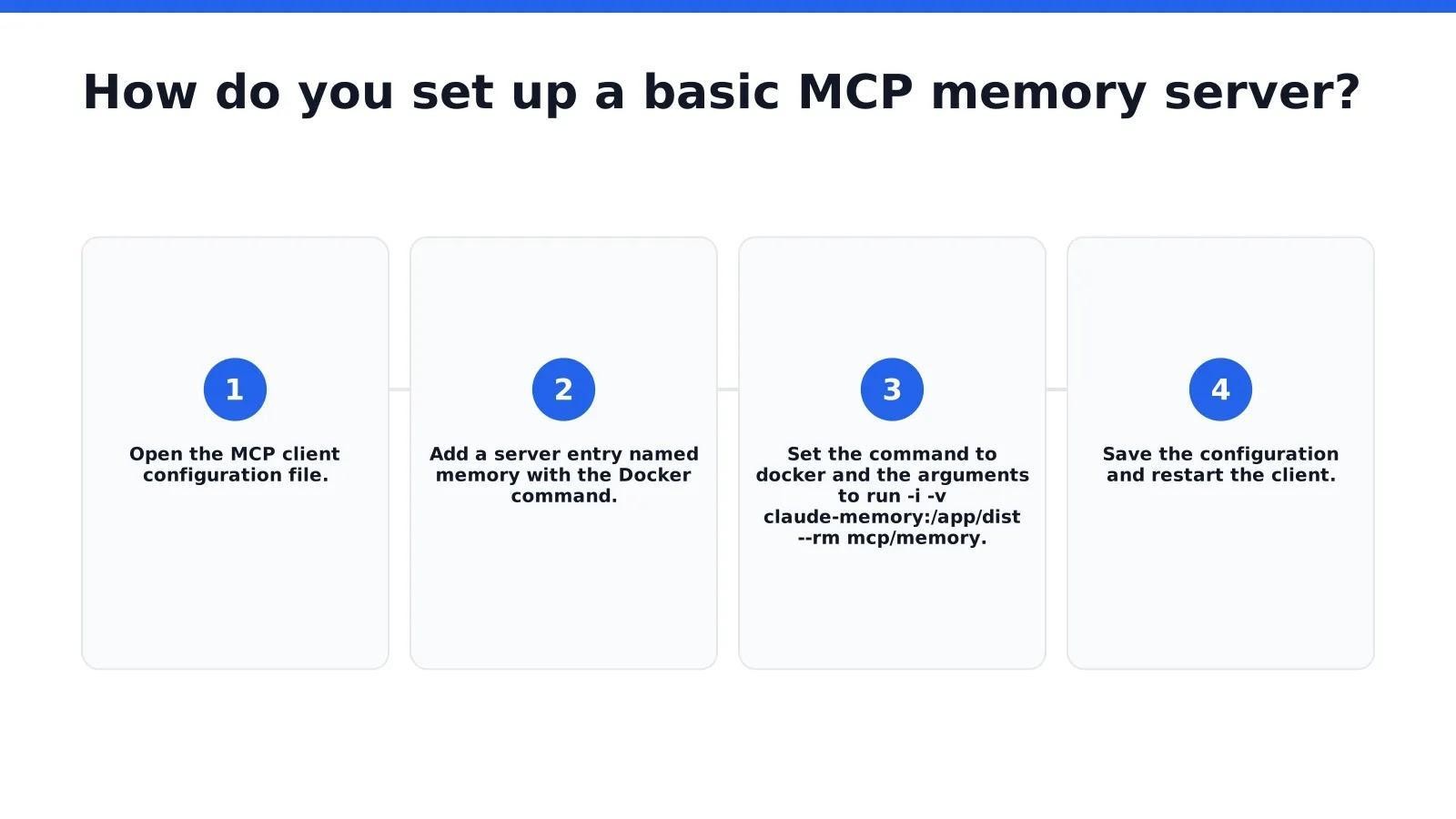
How do you set up a basic MCP memory server?
The reference server supports npm and Docker configurations. For a Docker-based example, the client launches the memory container and mounts a persistent volume. Client configuration formats differ, so use the setup section for the client you operate (reference configurations).
What prerequisites does the setup require?
For the Docker path, install and start Docker and use an MCP client that supports local stdio servers. The npm path uses the Node.js version required by the current package. The local reference graph requires no separate memory-service key; the assistant or model provider may still need credentials.
How do you configure the server?
Follow these steps in order:
1. Open the MCP client configuration file.
2. Add a local stdio server entry named memory with command docker.
3. Set args to ["run", "-i", "-v", "claude-memory:/app/dist", "--rm", "mcp/memory"], following the reference configuration.
4. Save the configuration and restart the client.
The named volume persists independently of a container removed with --rm. Confirm the mounted storage path, back up the graph, and test a write followed by recall from a fresh client session. When using npm, configure MEMORY_FILE_PATH to control where the graph is stored (storage configuration).
What comes after the basic setup?
For EverOS-backed memory, use everos-mcp. It connects supported assistants to EverOS Cloud or a self-hosted endpoint. The connector runs through uvx everos-mcp; configure the Cloud API key or self-hosted base URL as described for your client, rather than placing credentials in memory. EverMe separately provides a CLI and plugins for cross-agent personal memory.
What architecture choices matter for production memory?
Separate the responsibilities of durable storage, memory processing, retrieval, and host context assembly. In EverOS, Markdown is the source of truth, SQLite holds local state and processing data, and LanceDB supplies derived search indexes. Background processing can extract user profiles, agent cases, and skills (EverOS memory lifecycle).
A useful memory workflow handles writes, updates, provenance, scope, and deletion—not just similarity search. Retrieve enough relevant context for the task, and check how that context affects answer quality and token usage. The final context budget remains a host-application decision.
How does memory processing support long-term use?
EverOS can derive structured records from conversations and agent experience, then refine profiles and reusable skills through configured processing. Canonical files remain inspectable, while derived indexes synchronize in the background. Allow that work to complete when testing newly written memories (processing and consistency).
How should you evaluate a production memory design?
EverMind’s EverOS product page reports 93.05% accuracy on LoCoMo, while its About page reports 83.00% on LongMemEval. These published reference results describe particular evaluations; deployment quality also depends on the model, data, retrieval configuration, and system version.
Alongside benchmark results, test the behavior your application needs: a preference written in one session should be recalled in another, a correction should supersede outdated information, and one user’s records should not leak into another user’s search. Include indexing delays, deletion behavior, and recovery from interrupted writes.
FAQ
What is an MCP memory server and how does it work?
It exposes read and write tools through MCP. A backend may use a knowledge graph, files, a database, or another memory model. The reference implementation uses a persistent JSONL graph; the protocol itself does not prescribe a universal memory format.
How do I set up a basic MCP memory server?
Choose a supported npm or Docker configuration from the reference documentation, set a durable storage location, and register the server in your client. Confirm a write can be recalled after restarting the client (setup examples).
How does EverOS fit into an MCP memory setup?
EverOS is a memory backend; everos-mcp is the connector that makes its memory tools available to compatible assistants. The runtime combines readable Markdown, local indexes, and background memory processing, while the client controls which tools to call and which memories to use (connector guide).
Conclusion
Choose the backend for the memory lifecycle you need, then connect it through the interface your agent supports. A reference graph is a useful starting point for explicit facts and relationships. EverOS offers a file-native runtime with user and agent memory surfaces and a cloud or self-hosted path. In either case, validate durable recall and access boundaries before relying on it.
An MCP memory server lets an AI application read and write durable knowledge through the Model Context Protocol. The storage backend determines how memories persist; MCP supplies the connection between the client and its tools. Start with the reference knowledge-graph server to understand the workflow, or connect to EverOS for a memory runtime with editable Markdown and configurable background processing.
Key Takeaways
• MCP is an interface protocol. Whether memory persists across sessions depends on the backend, storage path, and client configuration.
• The reference memory server is available as @modelcontextprotocol/server-memory, with documented npm and Docker setup paths. Its local graph does not require a separate memory-service API key.
• EverOS uses canonical Markdown, local SQLite state, and LanceDB retrieval indexes. The everos-mcp connector exposes memory tools to compatible assistants.
• Validate writes, cross-session recall, updates, deletion, and memory scope before connecting a memory backend to production workflows.
What is an MCP memory server?
An MCP memory server exposes memory operations as tools that an MCP-compatible client can call. The client decides when to use them, and the backend stores and retrieves the data. This can preserve useful knowledge across sessions without putting the entire conversation history into every prompt (MCP architecture).
The reference memory server stores entities, relations, and observations in a local JSONL knowledge-graph file. Its documented client setup starts a local process over stdio. An HTTP or REST interface is a separate implementation choice, not a feature supplied automatically by every MCP server.
How does persistent memory change agent behavior?
Persistent memory gives an agent access to prior preferences, decisions, and task outcomes. The host still needs to select relevant records, respect their scope, and distinguish stored information from instructions. Retrieval speed and the quality of the resulting answers depend on the selected backend and workload.
What makes a memory server different from a large context window?
A context window contains the tokens available for a model invocation. A memory backend stores information that can be retrieved for later invocations, including new sessions. With EverOS, supported agents can read and update a durable corpus independently of any one conversation’s active context.
How do you set up a basic MCP memory server?
The reference server supports npm and Docker configurations. For a Docker-based example, the client launches the memory container and mounts a persistent volume. Client configuration formats differ, so use the setup section for the client you operate (reference configurations).
What prerequisites does the setup require?
For the Docker path, install and start Docker and use an MCP client that supports local stdio servers. The npm path uses the Node.js version required by the current package. The local reference graph requires no separate memory-service key; the assistant or model provider may still need credentials.
How do you configure the server?
Follow these steps in order:
1. Open the MCP client configuration file.
2. Add a local stdio server entry named memory with command docker.
3. Set args to ["run", "-i", "-v", "claude-memory:/app/dist", "--rm", "mcp/memory"], following the reference configuration.
4. Save the configuration and restart the client.
The named volume persists independently of a container removed with --rm. Confirm the mounted storage path, back up the graph, and test a write followed by recall from a fresh client session. When using npm, configure MEMORY_FILE_PATH to control where the graph is stored (storage configuration).
What comes after the basic setup?
For EverOS-backed memory, use everos-mcp. It connects supported assistants to EverOS Cloud or a self-hosted endpoint. The connector runs through uvx everos-mcp; configure the Cloud API key or self-hosted base URL as described for your client, rather than placing credentials in memory. EverMe separately provides a CLI and plugins for cross-agent personal memory.
What architecture choices matter for production memory?
Separate the responsibilities of durable storage, memory processing, retrieval, and host context assembly. In EverOS, Markdown is the source of truth, SQLite holds local state and processing data, and LanceDB supplies derived search indexes. Background processing can extract user profiles, agent cases, and skills (EverOS memory lifecycle).
A useful memory workflow handles writes, updates, provenance, scope, and deletion—not just similarity search. Retrieve enough relevant context for the task, and check how that context affects answer quality and token usage. The final context budget remains a host-application decision.
How does memory processing support long-term use?
EverOS can derive structured records from conversations and agent experience, then refine profiles and reusable skills through configured processing. Canonical files remain inspectable, while derived indexes synchronize in the background. Allow that work to complete when testing newly written memories (processing and consistency).
How should you evaluate a production memory design?
EverMind’s EverOS product page reports 93.05% accuracy on LoCoMo, while its About page reports 83.00% on LongMemEval. These published reference results describe particular evaluations; deployment quality also depends on the model, data, retrieval configuration, and system version.
Alongside benchmark results, test the behavior your application needs: a preference written in one session should be recalled in another, a correction should supersede outdated information, and one user’s records should not leak into another user’s search. Include indexing delays, deletion behavior, and recovery from interrupted writes.
FAQ
What is an MCP memory server and how does it work?
It exposes read and write tools through MCP. A backend may use a knowledge graph, files, a database, or another memory model. The reference implementation uses a persistent JSONL graph; the protocol itself does not prescribe a universal memory format.
How do I set up a basic MCP memory server?
Choose a supported npm or Docker configuration from the reference documentation, set a durable storage location, and register the server in your client. Confirm a write can be recalled after restarting the client (setup examples).
How does EverOS fit into an MCP memory setup?
EverOS is a memory backend; everos-mcp is the connector that makes its memory tools available to compatible assistants. The runtime combines readable Markdown, local indexes, and background memory processing, while the client controls which tools to call and which memories to use (connector guide).
Conclusion
Choose the backend for the memory lifecycle you need, then connect it through the interface your agent supports. A reference graph is a useful starting point for explicit facts and relationships. EverOS offers a file-native runtime with user and agent memory surfaces and a cloud or self-hosted path. In either case, validate durable recall and access boundaries before relying on it.
您可能还喜欢这些
相关

Multi-round retrieval: letting the model decide when to stop searching
multi-round retrieval,agentic retrieval,fixed top-k,injection budget,core selection,EverOS,agent memory,LoCoMo,LongMemEval,EverMemBench,SubtleMemory,multi-hop retrieval,retrieval accuracy,prompt token cost

Do public SKILL.md files actually make agents better?
SkillCorpus,SKILL.md,agent skills,skill curation,skill retrieval,LLM agents,SkillsBench,GDPVal,agent harness

CRAFT: learning how to fuse video tokens, not just which to drop
CRAFT,video token compression,vision-language models,video VLM,KV cache,prefill cost,token merging,token pruning,temporal reasoning

Self-evolving agents have a measurement problem
self-evolving agents,agent harness,HarnessBank,credit assignment,LLM agents,agent evaluation,harness optimization,significance testing
MCP Memory Server Architecture and Setup
Learn how MCP memory servers persist knowledge across sessions, set up the reference server, and connect agents to EverOS through MCP.
EverMind研究人员
About 5 minutes to read